A free Submagic alternative for Premiere Pro
Submagic is a popular web app for animated captions on short videos. You upload a clip, it adds captions, and you download the result.
If you already edit in Premiere Pro, there's a simpler way: add the same kind of captions right on your timeline, for free, without uploading anything.
In short
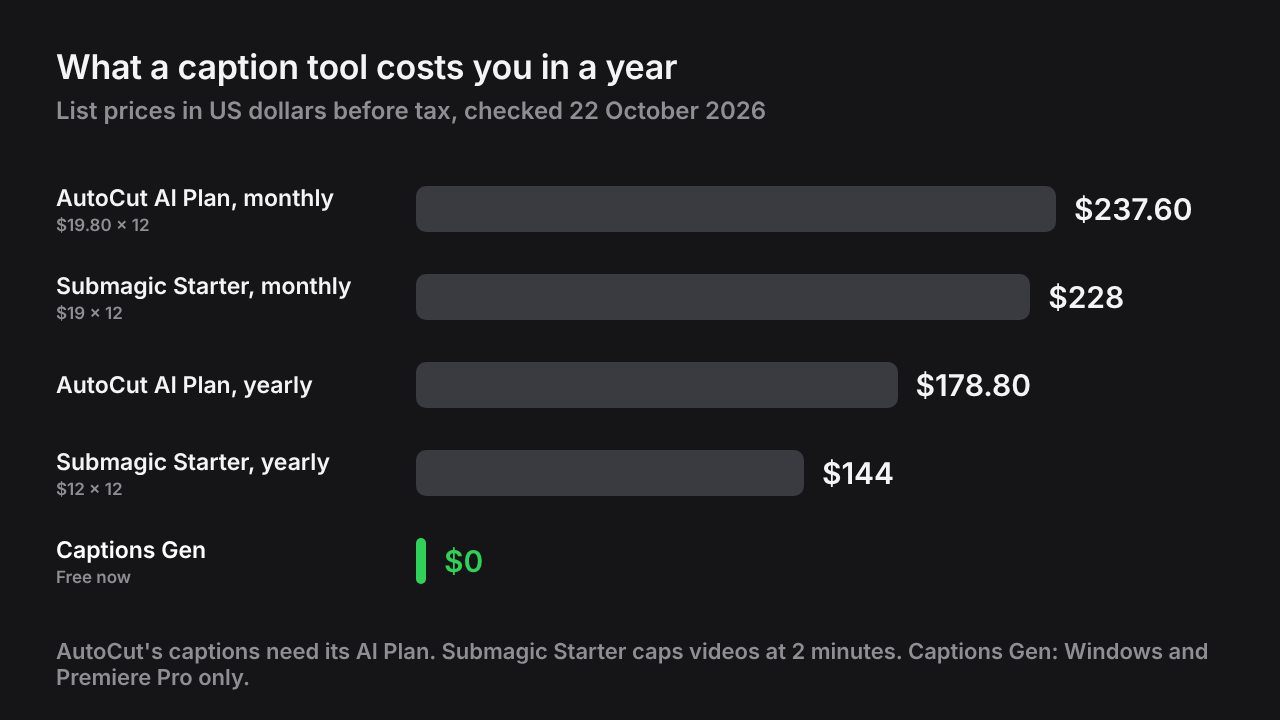
- Submagic runs in the browser. Plans cost $19 to $69 a month, with a cap on video length.
- Its free plan covers three short videos.
- Captions Gen adds Submagic-style captions inside Premiere Pro for free, with no watermark and no length limit.
- Submagic also adds B-roll, emojis and sound effects. Captions Gen is captions only, on Windows.
Note: I make Captions Gen, so read this with that in mind. The Submagic facts come from Submagic's own pricing and help pages, checked on 22 October 2026.
How Submagic works
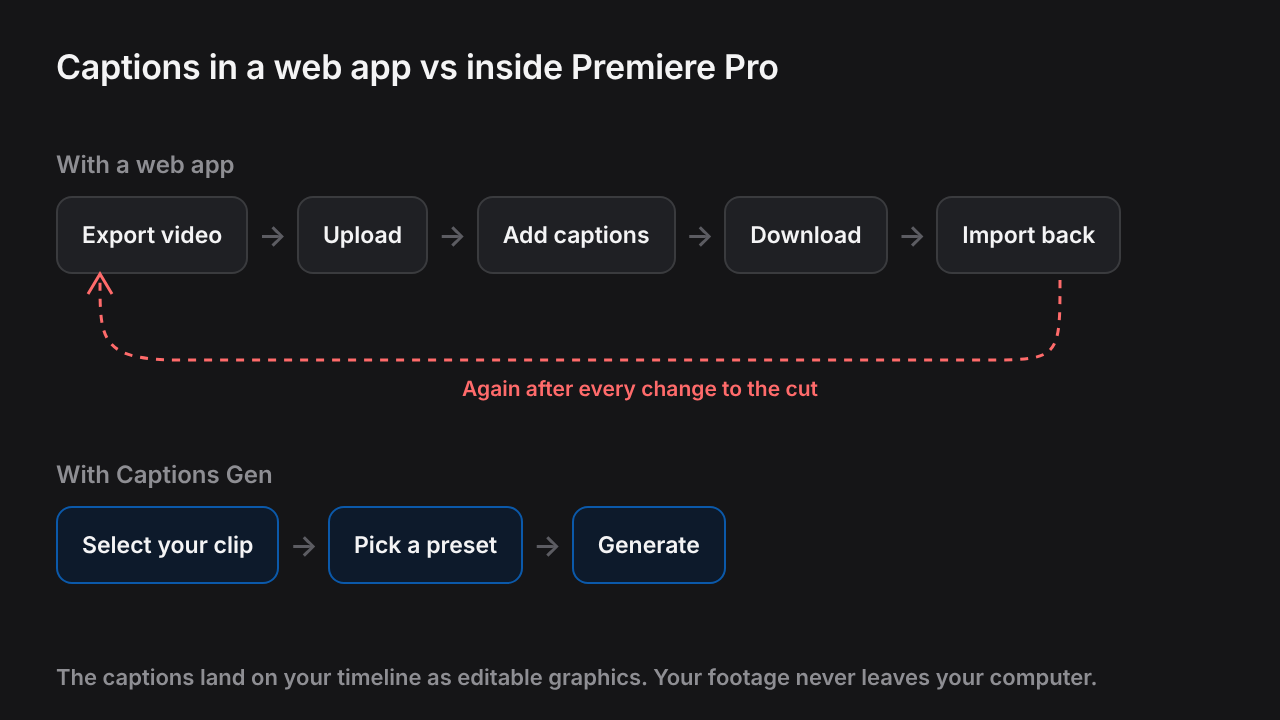
Submagic is a website, not a Premiere Pro plugin. The workflow looks like this:
- Export your video from your editor.
- Upload it to Submagic.
- Pick a caption style and fix the words.
- Download the video with the captions burned in.
- Import it back into Premiere if you want to keep editing.
Submagic vs Captions Gen
| Submagic | Captions Gen | |
|---|---|---|
| Where it runs | In the browser (web app) | Inside Premiere Pro |
| Price | $19, $39 or $69/month ($12, $23 or $41/month billed yearly) | Free |
| Free option | 3 short videos; paid plans export without a watermark | Free, no time limit, no watermark |
| Video length | Up to 2, 5 or 30 minutes by plan | No limit |
| Your footage | Uploaded (up to 3,000 MB) | Stays on your computer |
| Edit captions later | In Submagic, before export | Editable graphics on your Premiere timeline |
| Extras | B-roll, zooms, emojis, sound effects and more | Captions only |
| Mac | ✓Any browser | ✕Windows only |
Sources: Submagic pricing, Submagic free plan, Submagic upload limits. Prices in US dollars; check the vendor's site before buying.
Why editors look for an alternative
- The round trip. Every change to the cut means exporting, uploading and downloading again.
- Length caps. Longer videos need a bigger plan.
- Client footage. Some clients don't want their footage uploaded to another service.
- Burned-in captions. Once downloaded, a typo means going back to the web app.
When Submagic is the better pick
- You don't edit in Premiere Pro, or you work on a Mac.
- You want one tool that also adds B-roll, emojis and sound effects to a talking-head clip.
Get the same looks in Premiere
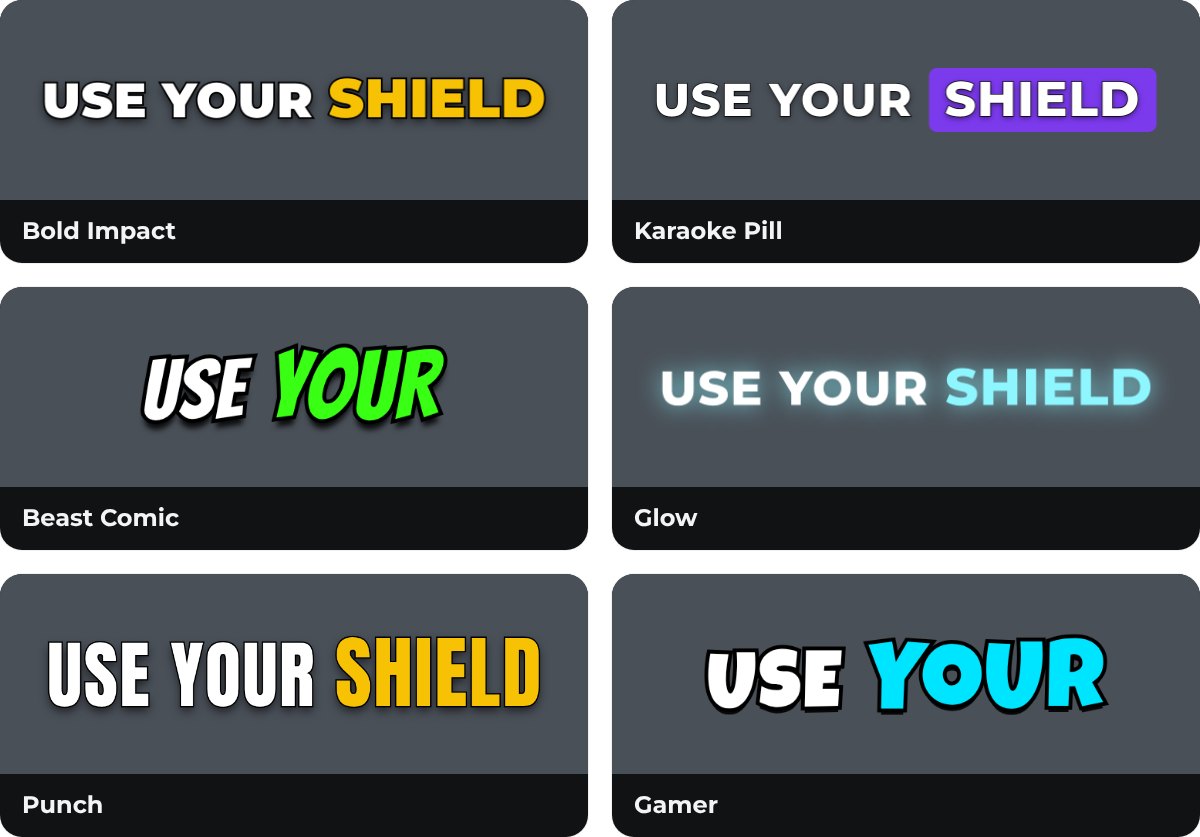
The most popular Submagic-style looks have a matching free preset in Captions Gen:
| The look you want | Preset to pick |
|---|---|
| Heavy caps, yellow spoken word | Bold Impact |
| Comic font, bouncing green word | Beast Comic |
| Colored box behind the spoken word | Karaoke Pill |
| Two lines, the word turns green | Karaoke |
| Soft glowing text | Glow |
| Calm, sentence case | Podcast |
Step by step
- Download Captions Gen and run the installer. It needs Windows 10 or 11 and Premiere Pro 25.0 or newer.
- Open Premiere Pro and go to Window > UXP Plugins > Captions Gen.
- Select the clip with the voice in your timeline.
- Pick a preset on the Presets tab.
- Press Generate.
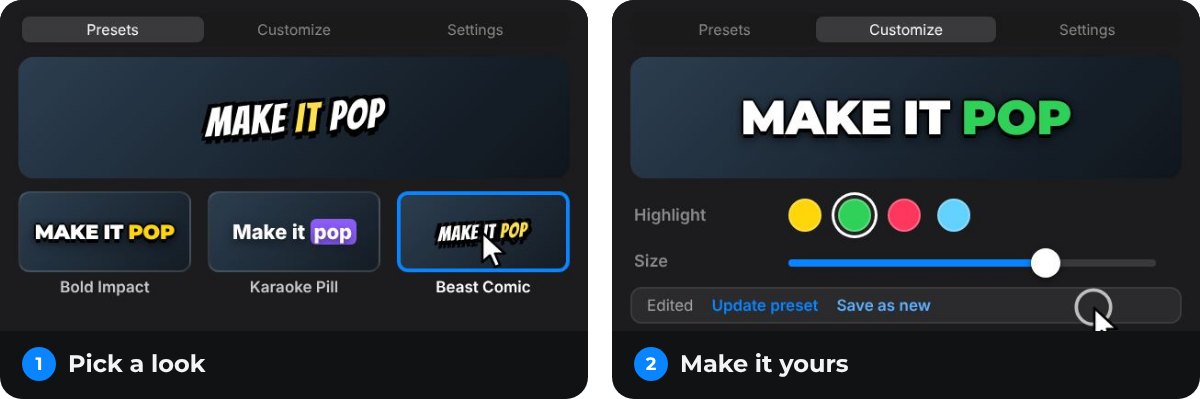
Changed the cut? Generate again. Want a different look? Pick another preset and click Apply style to placed captions. You never leave Premiere Pro.
Tip: Captions Gen places captions as separate graphics, not burned into the video. You can fix a typo on the timeline at any time.
Questions people ask
Is Submagic free?
Submagic's free plan covers three short videos. Paid plans cost $19, $39 or $69 a month, or $12, $23 or $41 a month billed yearly (checked 22 October 2026).
Is there a free Submagic alternative without a watermark?
Yes. Captions Gen is free with no watermark and no time limit. It works inside Premiere Pro on Windows.
Does Submagic work inside Premiere Pro?
No. Submagic is a web app. You export your video, upload it, add captions and download the result.
Can I get Submagic-style captions in Premiere Pro?
Yes. Captions Gen has presets for the same popular looks, such as Beast Comic, Bold Impact and Karaoke Pill, and places them on your timeline as editable graphics.
Is my footage uploaded with Captions Gen?
No. Captions Gen transcribes on your computer. Nothing is uploaded.
Try animated captions on your own edit
Captions Gen creates word-synced animated graphics inside Premiere Pro, with local Whisper transcription, karaoke highlights, animation presets, and one-click restyling of placed captions. Native captions remain useful when you need subtitles or a separate caption file.
Windows 10/11 · Premiere Pro 25.0+. Free, with no time limit and no watermark.
Download free See the caption styles