A free AutoCut alternative for captions
AutoCut is a popular extension for Premiere Pro and DaVinci Resolve. It cuts silences, switches podcast cameras, adds zooms and more. It also makes captions, but only on its paid AI Plan.
If captions are all you need, you don't have to pay for a whole editing suite. Here's how AutoCut compares with a free alternative for captions.
In short
- AutoCut's captions (AutoCaptions) need the AI Plan: $19.80 a month or $178.80 a year.
- Captions Gen makes animated, word-by-word captions in Premiere Pro for free. No time limit, no watermark.
- AutoCut does a lot more: silence cutting, zooms, B-roll. Captions Gen is captions only.
- Captions Gen is Windows and Premiere Pro only. AutoCut also runs on Mac and DaVinci Resolve.
Note: I make Captions Gen, so read this with that in mind. The AutoCut facts below come from AutoCut's own pages, checked on 22 October 2026.
What AutoCut is
AutoCut is a set of AI editing tools that run inside Premiere Pro and DaVinci Resolve. The main ones:
- AutoCut Silences: removes pauses and dead air.
- AutoPodcast: switches between podcast cameras by who's talking.
- AutoZoom: adds punch-in zooms.
- AutoCaptions: adds animated captions.
It's a strong tool if you use several of those. If you only want captions, you're paying for a lot you don't use.
What AutoCut captions cost
AutoCaptions is part of the AI Plan. That's $19.80 a month, or $178.80 if you pay for the year. There's a 14-day free trial with no card needed.
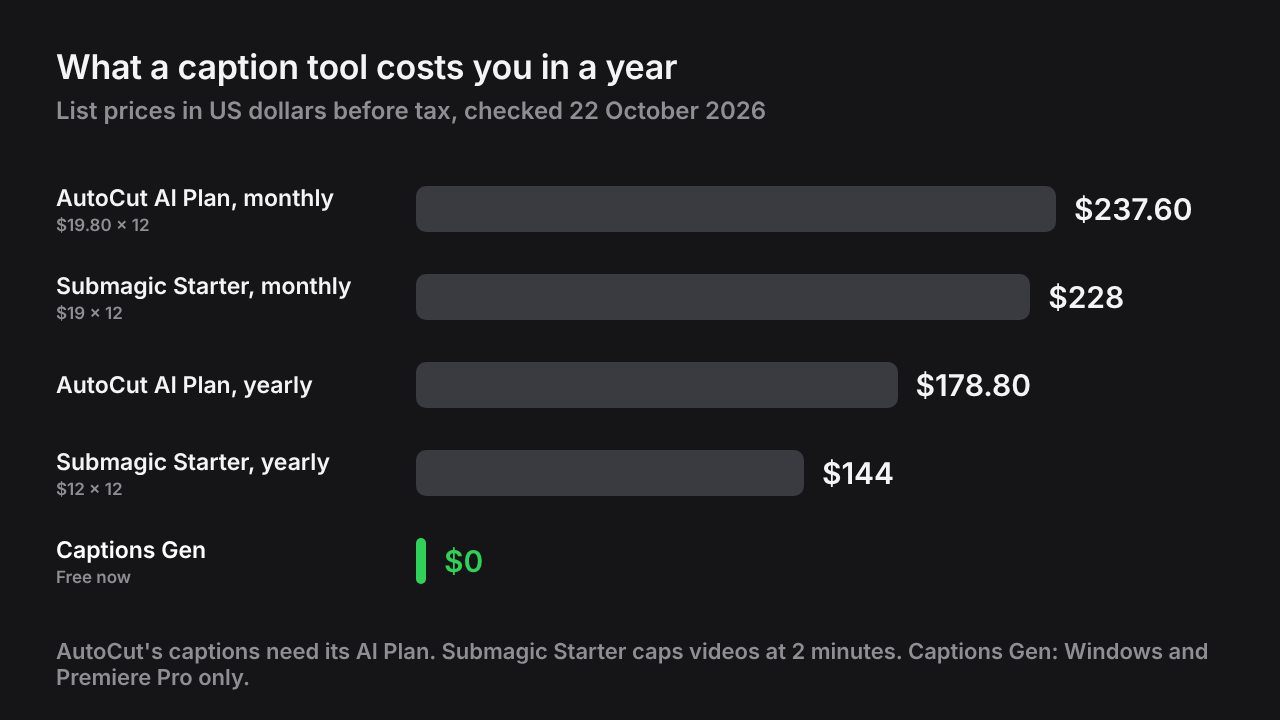
AutoCut vs Captions Gen
| AutoCut | Captions Gen | |
|---|---|---|
| Price for captions | AI Plan, $19.80/month or $178.80/year | Free |
| Free option | 14-day trial, no card | Free, no time limit, no watermark |
| Animated word-by-word captions | ✓Yes | ✓Yes |
| Presets | Editable presets; 90+ in Advanced AutoCaptions | 18 presets, plus your own saved presets |
| Transcription | Not stated on its site | On your computer |
| Silence cutting, zooms, B-roll | ✓Yes | ✕No, captions only |
| Premiere Pro | ✓Yes | ✓Yes |
| DaVinci Resolve | ✓Yes | ✕No |
| Mac | ✓Yes | ✕Windows only |
Sources: AutoCut pricing, AutoCaptions, AutoCut free trial. Prices in US dollars before tax; check the vendor's site before buying.
When AutoCut is the better pick
- You also want silence cutting, zooms or podcast camera switching.
- You edit on a Mac or in DaVinci Resolve.
- You already pay for the AI Plan. Try its captions before adding another tool.
When Captions Gen is the better pick
- You only need captions. No subscription for one feature.
- You want your footage to stay private. Captions Gen transcribes on your computer.
- You reuse one style. Save your look as a preset, star it, and every video gets it.
- You want to restyle later. Pick another preset and apply it to captions you already placed.

How to switch
It takes about five minutes.
- Download Captions Gen and run the installer. It needs Windows 10 or 11 and Premiere Pro 25.0 or newer.
- Open Premiere Pro and go to Window > UXP Plugins > Captions Gen.
- Select the clip with the voice in your timeline.
- Pick a look on the Presets tab.
- Change colors or size on Customize if you like.
- Press Generate.
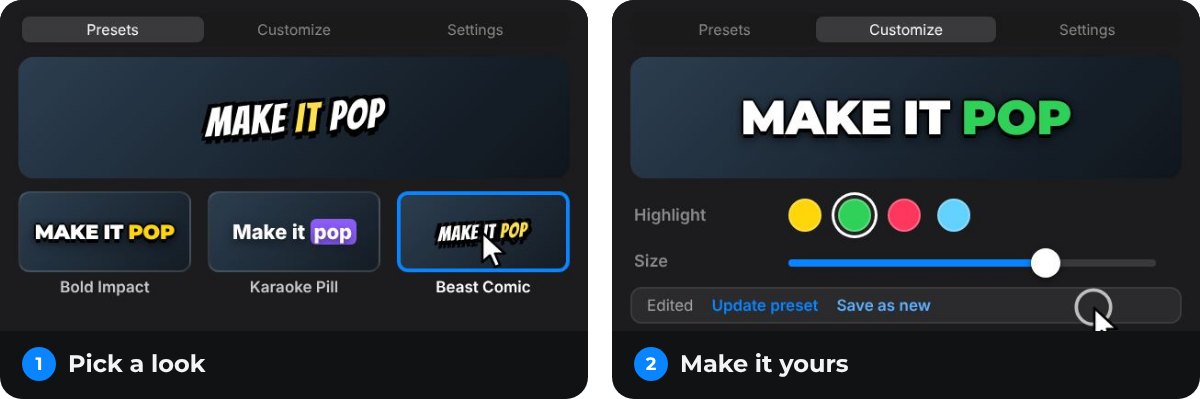
Using both together
You don't have to choose. You can keep AutoCut for cutting and use Captions Gen for the captions.
- Cut your video with AutoCut as usual.
- Select the final clip and generate captions with Captions Gen.
Tip: Add captions last. If you change the cut afterwards, generate again so the timing stays right.
Questions people ask
Is AutoCut free?
No. AutoCut has a 14-day free trial with no card needed. After that, its captions feature (AutoCaptions) is part of the AI Plan at $19.80 a month or $178.80 a year (checked 22 October 2026).
What is the best free AutoCut alternative for captions?
If you edit in Premiere Pro on Windows, Captions Gen is free with no time limit and no watermark. It makes animated, word-by-word captions on your timeline. It doesn't cut silences.
Is there a free AutoCut alternative for DaVinci Resolve or Mac?
Captions Gen works only in Premiere Pro on Windows for now. DaVinci Resolve Studio has its own built-in subtitles, and Premiere Pro on Mac has built-in captions without word highlights.
Can I use AutoCut and Captions Gen together?
Yes. Use AutoCut to cut silences and zoom, then Captions Gen to add the captions. They don't get in each other's way.
Does Captions Gen upload my footage?
No. It transcribes on your computer. Your audio and video don't leave your machine.
Try animated captions on your own edit
Captions Gen creates word-synced animated graphics inside Premiere Pro, with local Whisper transcription, karaoke highlights, animation presets, and one-click restyling of placed captions. Native captions remain useful when you need subtitles or a separate caption file.
Windows 10/11 · Premiere Pro 25.0+. Free, with no time limit and no watermark.
Download free See the caption styles